Last time I taught a $20 camera to stop gossiping with a server in China. This time I gave it eyes — and then spent an evening discovering fresh and exciting new ways to be wrong.
Missed episode one? The camera is a cheap Xiaomi cube that used to phone home to the cloud, and now doesn't: Taking a $20 cloud camera off the cloud. It streams to my browser in under a second, and nothing leaves the house.
Which was lovely. And then, inevitably, I thought: what if it knew what it was looking at?
Feynman had a line: "The first principle is that you must not fool yourself — and you are the easiest person to fool." Reader, since we last spoke I have fooled myself in several creative new ways. One of them involved painting beautiful boxes onto a sheet of glass I had personally made invisible, and then standing back, puzzled, wondering why the room looked so empty.
We'll get there.
The boring-but-important bit: this is a pet project, for fun. My camera, my wifi, my living room, my face (blurred below, because I have some dignity left). Nothing leaves my house. Nothing is uploaded anywhere. Please only ever point clever software at rooms that are actually yours.
A very small dictionary 🔍
Four words, then we're done forever:
- A model — a big pile of maths that has stared at millions of photos until it learned "that blob is usually a person." It does not understand anything. It is an extremely confident pattern-matcher with no inner life and no hobbies.
- Confidence score — a number from 0 to 1 saying how sure it is.
0.91means "quite sure."0.44means "that's a person, or possibly a cushion, and I'd rather not commit in writing." - Bounding box — the rectangle it draws around whatever it found. The universal computer-vision way of announcing "there's a guy. Roughly. Somewhere around here."
- YOLO — "You Only Look Once." A famously fast way of spotting things. Also, tragically, the exact attitude with which I deploy code at 1am.
That's it. That's the dictionary. There's no test, but the camera is watching you now, and it is keeping score.
What it does now
Two new tricks. Both work in a plain browser — laptop or phone, anywhere on my wifi. No app. No account. No sign-up form asking for my birthday. Just a web address, like the internet used to be before it got needy.
It counts people, all day, by itself
There's a People tab. Every four seconds the camera has a look, counts the humans, and scribbles the number in a notebook. Then it draws me a chart: last hour, last day, last week.
It does this whether or not anyone is watching, because it lives on a little computer in the corner that never sleeps, never complains, and never once asks for a raise. It is comfortably the best employee I have ever had. It works for electricity.
I gave it two different sets of eyes, and you can swap between them while it's running:
- The old, humble one. Reliable. Light. Occasionally looks directly at me and concludes: furniture.
- YOLO. Sharper. Spots me even when the other one has decided I'm a sofa.
Click a button, the eyes swap, nothing restarts. It even remembers which set of eyes made each count — because mixing up two different opinions on one chart is how you end up confidently graphing nonsense.
It draws boxes on live video
Three switches: People, Hands, Face. Everything gets a label and a number, because a guess with no number attached is just vibes.
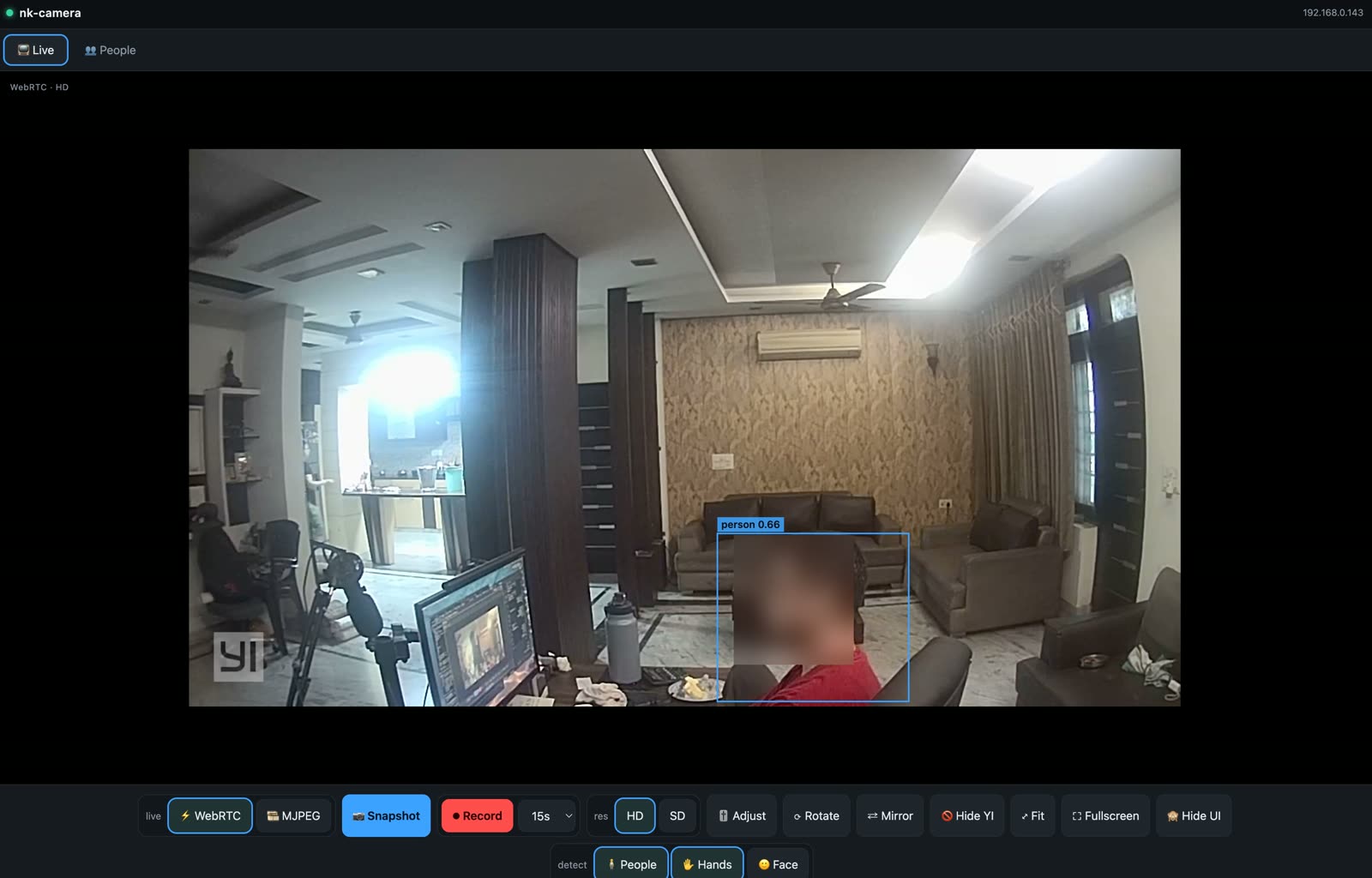
person 0.66. My own camera is two-thirds sure I'm a person. Honestly, on a Monday, that feels generous.
Now watch what happens when I wave at my own ceiling like a lunatic:
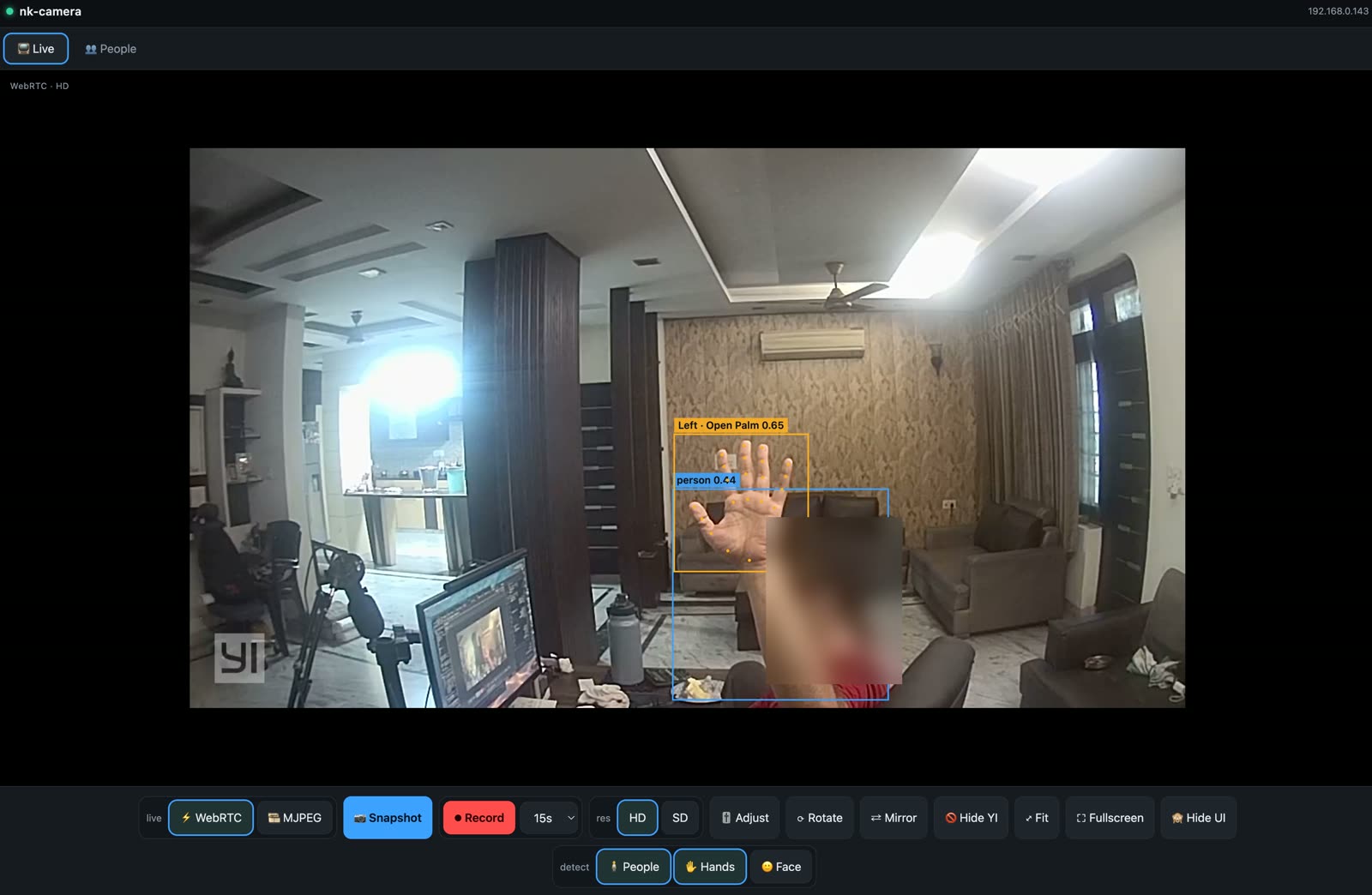
It knows it's a hand. It knows it's the left one. It knows the palm is open. It has put an orange dot on every knuckle like an overachiever. Meanwhile, over in the corner, person 0.44 — the moment I raise my arm, the people-detector quietly downgrades me from "human" to "eh, maybe."
Yes: waving makes it less sure I'm a person. I find this deeply relatable.
And here it is on my phone, on the sofa, over my own wifi:
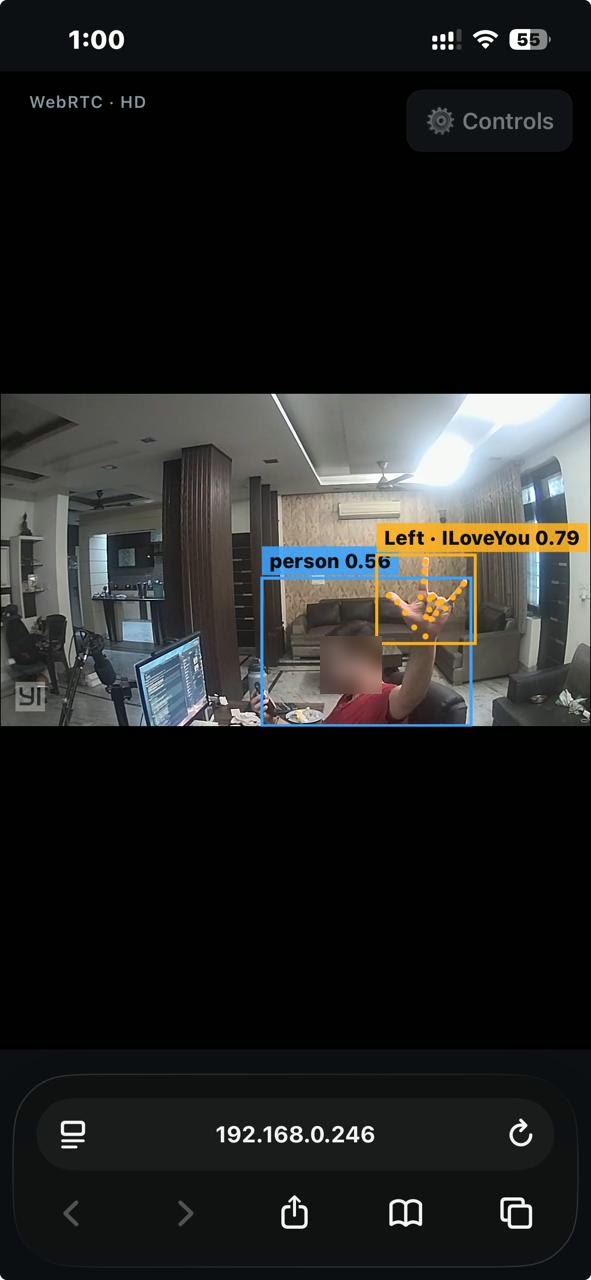
Left · ILoveYou 0.79. I sat on my sofa and signed I love you at a $20 camera, and it understood, and it was 79% sure, and it told my phone. Reader, I have never felt so seen by a household object. The person detector, meanwhile, has me at 0.56 — my own camera loves me back, but with reservations.
It reads faces too. Not who you are — just what your face is doing. Smiling, blinking, eyebrows up. It will inform you mouth smile left 0.96 with the flat authority of a machine that has never once smiled itself.
Nothing is recorded. The people-count goes in the notebook, because that's the whole point of a chart. The hands and faces are drawn on screen and then forgotten instantly, like my new year's resolutions.
The one interesting decision, explained with no jargon
The people-counter naps. It wakes up every four seconds, looks, counts, writes it down, goes back to sleep. Perfect for "how busy was the living room on Tuesday?"
Completely useless for a wave.
A thumbs-up lasts well under a second. Something that opens its eyes once every four seconds will miss it — the way you'd miss a hummingbird by glancing up once per song.
To catch a wave you have to look about twelve times a second. That's a lot of thinking. And if the little computer in the corner did all that thinking and then posted the boxes back to my phone, they'd arrive late — a third of a second behind the video. You'd wave, and a rectangle would come sailing along afterwards like a balloon on a string, trying to catch up with your hand.
So: your phone draws the boxes, on the picture already on its screen. The thinking happens on the thing that's already looking. Boxes land exactly where they should, and the little computer in the corner goes back to its nap.
Your phone gets its eyes from my camera, not from Google. This entire contraption never once talks to the internet. It would work perfectly well in a bunker, which is a sentence I did not expect to be proud of.
A museum of things that went wrong
I promised last time that the wrong turns are the fun part. I have not run out of wrong turns.
Exhibit A · The invisible masterpiece
I built the whole thing. I opened the page. I switched the boxes on.
Nothing.
Not wrong boxes. Not boxes in the wrong place. Nothing at all — which is the most maddening kind of bug, because there's nothing to look at and therefore nothing to blame.
So I got a browser to tell me, in small words, what it thought it was doing. It said:
I have drawn 3,830 pixels of beautiful boxes. I have drawn them onto a sheet of glass that is invisible.
There it was. The eyes worked. The maths was right. The boxes were, I'm told, gorgeous. And I had painted them with enormous care onto a pane of glass that I had earlier, with equal care, made invisible — and then stood back and wondered why the room looked empty.
The cause is one of those things that is obvious for the rest of your natural life. Earlier I'd said "hide that glass." Later, to bring it back, I said "I have no strong feelings about that glass." And with no strong feelings from me, the earlier instruction — stay hidden — simply won.
I hadn't argued with the computer. I'd shrugged at it. It shrugged back.
Exhibit B · The test that passed and proved nothing
This is the one that stings, and it's the reason Exhibit A escaped into the wild.
I did test it. Automatically. In a real browser. The test went green. I felt like a professional. I shipped it with the serene confidence of a man about to walk into a glass door.
But my test drew the boxes on a little practice page I'd built myself — a page that didn't have the instruction that hid the glass. So my test proved "the code can draw." It never once asked the only question that mattered: "can a human actually see it?"
A green test told me a broken thing worked. It hadn't lied. It had answered exactly the question I asked, and I had asked a useless one.
The test now asks the rude questions instead: is it visible? Is it sitting exactly on top of the video? If I tap it, does the tap still reach the video underneath? Ask better questions and the machine stops flattering you.
Both exhibits are the same shape. The computer did precisely what I said. The bug was that what I said was slightly different from what I meant — and then I read my own good intentions back out of the code, instead of reading what was actually written there. You are the easiest person to fool.
So what's it like to use?
Open a web address on the wifi. That is still the entire user manual.
- Any browser — my laptop, my phone, my wife's phone, the tablet nobody has touched since 2019.
- My wifi only. No cloud, no account, no app. If my internet died tonight, every bit of this would keep working, which I find genuinely comforting.
- Live video in under a second, boxes drawn straight on top.
- Tap the picture for fullscreen. On an iPhone this took an embarrassing amount of fiddling, because iOS grabs any fullscreen video, hands it to its own player, and that player cheerfully paints over my boxes like a toddler with a roller.
- Hide UI — one button, every button vanishes, just the picture. For when you prop an old phone on a shelf and pretend you own a security system.
- The People tab — a chart of how busy the room was. Turns out: not very. It's mostly me. Once, memorably, a fan.
Small honest footnotes
- It counts how many people are in the room right now — not how many walked through. Telling "two visitors" from "one guy who keeps wandering back for biscuits" means the camera has to remember faces between glances, and that's a different project, and frankly a creepier one.
person 0.44is a real number from a real frame. My camera is 44% sure I exist. I have decided to find this humbling rather than upsetting.- The gestures are never saved. The camera sees me sign I love you, feels nothing, and forgets immediately. Which, in fairness, is also how it went in school.
What's next
Motion alerts. A nicer chart. And the eternal, unfinished quest from last time: teaching it to tell my cat from an actual intruder.
Current status: it can find a person, name the hand you're waving, spot "I love you" from across the room, and clock a smile at 96% confidence — but a cat still reads as a small confused sofa. My priorities remain, clearly, wrong.
There is also a blue light on the camera that I have not managed to switch off. I know exactly which secret switch controls it. I also know that flipping it wrong may convince the camera it no longer owns a lens. So it blinks at me. I blink back. We have an understanding.
It's all open source — the whole thing, including every comment I left for the next idiot (me, in six months): github.com/nitkap01/localcamera-service.
Pull requests, better jokes, and a working cat-detector remain extremely welcome.
Keeping it wholesome: my camera, my wifi, my living room. Nothing is exposed to the internet, nothing is uploaded, the gestures aren't recorded, and the face in the screenshots is blurred on purpose. Be excellent to each other, and only ever teach eyes to hardware you own.